Add
Navigate to module Restaurants and click the button +Add.
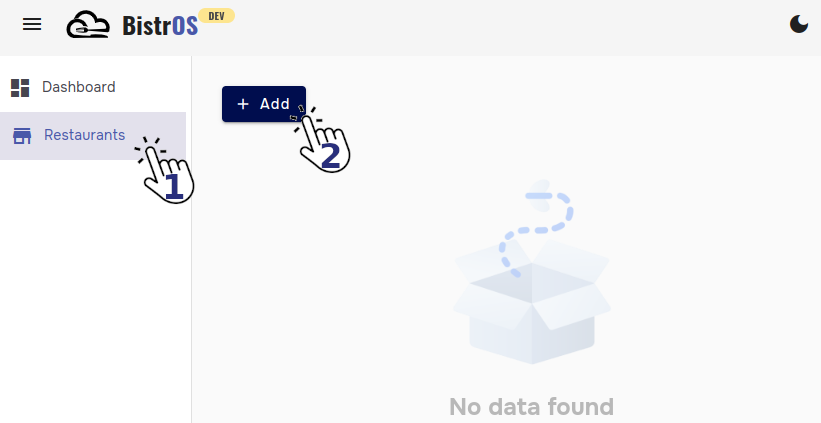
Provide the requested information
1. Logo: Click the image square to upload the image of your logo.
OptionalDatatype→image (jpg, jpeg, png)Max length→2 MB
Large images
In case you want to upload a larger image, some tools on the internet will help you to compress them. Due to the design of BistrOS is not necessary to have high-resolution images.
2. Name: Type the name of the restaurant.
MandatoryDatatype→alphanumericMax length→40 characters
3. Description: Type a short description for your restaurant.
OptionalDatatype→alphanumericMax length→80 characters
4. Default language: Select from the list the default language for your restaurant.
MnadatoryDatatype→list
Languages
BistrOS will assume that all configurations (name, descriptions, etc) will be in the selected default language.
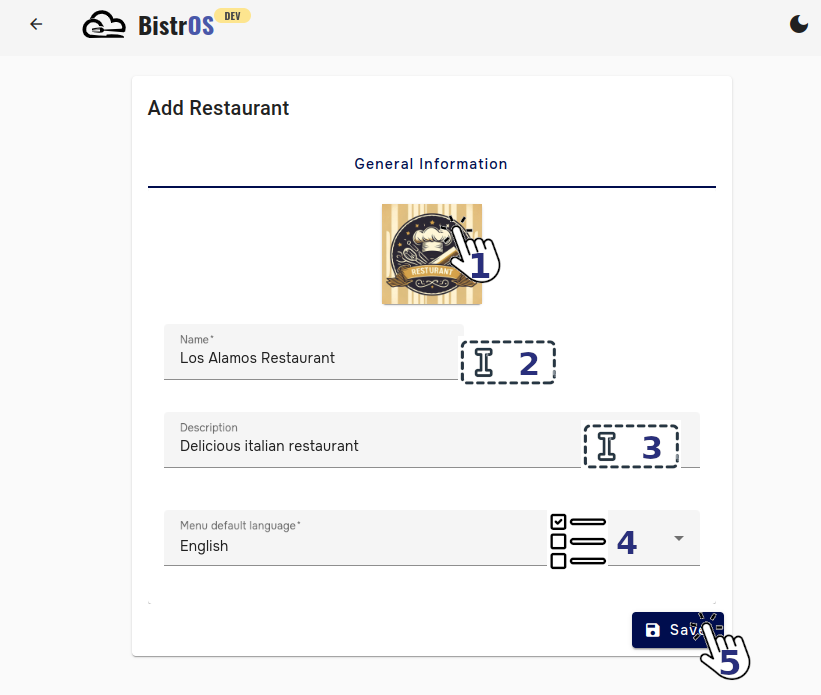
5. Save: Click in the save button to save the changes.
Branches
To manage branches you can add multiple restaurants.
Ready
Your restaurant has been created.