Add
Navigate to module Products and click the button +Add.

Provide the requested information.
1. Photo: Click the image square to upload a photo of your product.
OptionalDatatype→image (jpg, jpeg, png)Max length→2 MB
Large images
In case you want to upload a larger image, some tools on the internet will help you to compress them. Due to the design of BistrOS is not necessary to have high-resolution images.
2. Name: Type the name of the product.
MandatoryDatatype→alphanumericMax length→40 characters
3. Description: Type a short description for your product.
OptionalDatatype→alphanumericMax length→80 characters
4. Price: Type the price of the product.
MandatoryDatatype→numberMin value→0
5. Calories: Type the calories of the product.
OptionalDatatype→numberMin value→0
6. Status: Enable or disable the product.
MandatoryDatatype→booleanDefault value→Active
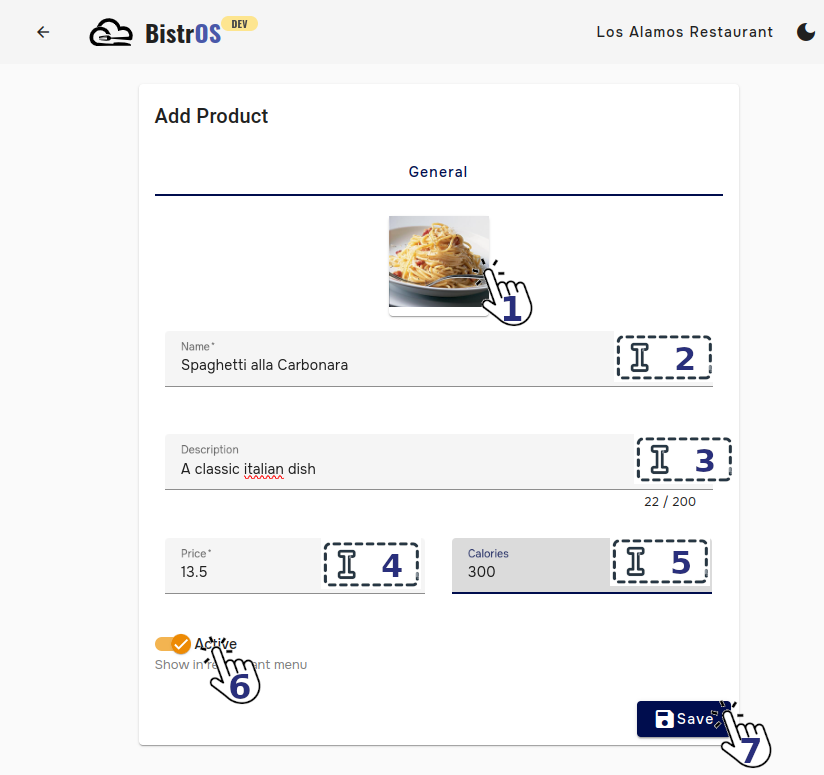
7. Save: Click in the save button to save the changes.
Accurate data
The information provide in this module will be shared with your clients through the menus.
Ready
Your product has been created.